

Module 2: Your Chair Is Your Throne – Make It Comfortable
The proper sequence of adjustments is the KEY to a successful ergonomic set-up. It starts with a comfortable ergonomic chair to make all other adjustments easier.
This is true even if you plan to use an adjustable height sit-stand desk that allows you to work in both sitting and standing postures. Did you know that most sit-stand desk users still remain seated well over 50% of the work day? We will cover more on sit-stand desks in a later module.
Important Chair Features
- Comfortable, durable, cushioned seat or high quality mesh seat
- Seat height adjustment
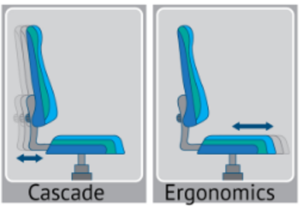
- Seat length adjustment of 2-3 inches (also called a “seat slider”)
- Backrest that locks into an upright sitting posture with 5-9 degrees of slight backward tilt depending on your preference
- Tilt tension adjustment and/or a locking adjustable backrest angle
- Comfortable lumbar support
- Height adjustable arm rests for those that prefer using them
Nice Chair Features if Available
- Adjustable lumbar support (up and down)
- Armrests that adjust inward/outward, forward/backward, or swivel to fit narrow or wide shoulders
- Knob to increase or decrease the amount of lumbar support
- Entire chair tilt or rocking feature
Points to Remember About Office Chairs:
- No chair will fit everyone.
- A standard sized chair should adjust to fit a wide range of sizes from over 5 feet tall to around 6 feet tall.
- Inexpensive chairs often compromise one or more of the desired ergonomic features.
- Armrests on inexpensive chairs may be less adjustable: too tall, too short or too wide.
- Inexpensive chairs tend to wear or break more quickly so a low-cost warranty may offer peace of mind.
- However, if you are willing to accept slight compromises, reasonably good chairs can still be found at low prices.
A Remote Chair Consultation can help you save time and money finding a comfortable, fitting chair that’s right for your budget. Just click the link below.
Let’s Get You Seated Properly
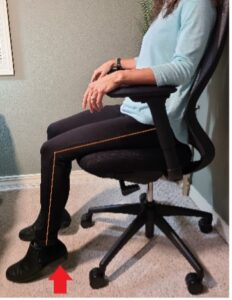
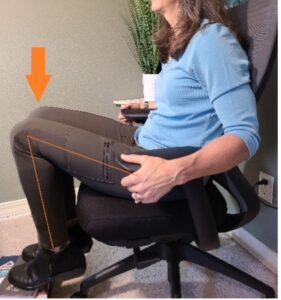
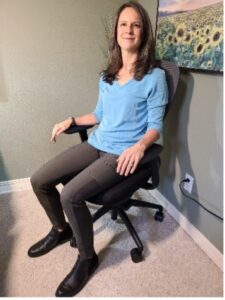
| Too Tall | Too Short | Just Right |
 |
 |
 |
- Slide your chair away from your desk.
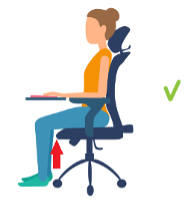
- Adjust the seat height until your feet rest squarely on the floor and your hips and knees are level (hips and knees bent approximately 90 degrees)
- Thighs should be parallel to the floor OR slightly downhill for comfort.
| Problems | Description | Solutions |
| The chair is too tall: Will not lower enough | Thighs are angled downhill and feet do not rest squarely on the floor. Happens with shorter workers or if a chair has a limited height range.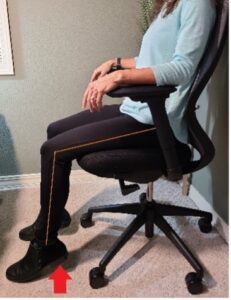 |
Add an adjustable footrest so that hips and knees are level |
| The chair is too low: Cannot raise seat high enough | Knees are higher than hips, causing stress to the low back. Happens with taller workers or if a chair has a broken cylinder.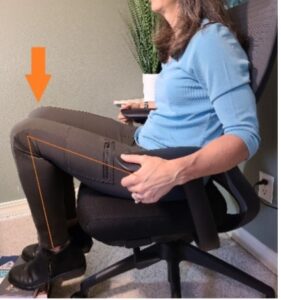 |
Replace chair with a taller cylinder model. Make sure there is adequate clearance for the legs under the desk for tall workers |
 |
 |
- Slide all the way back against the backrest.
- The front edge of the seat should not press into the back of your knees.
- You need at least 2-3 inches (2-3 fingers) of space behind your knees to allow wiggle room for the legs.
Conversely:
- If your seat length is too short, leaving a gap of more than 3-4 inches (3-4 fingers) of space behind your knees, you will suffer from lack of thigh and back support.
Use your fingers to measure how much space is behind your knees if any:
| Problems | Description | Solutions |
| The seat depth is too long: The front edge of the seat hits the back of the knees | Common in shorter individuals. Prevents workers from being able to sit all the way back in the chair and benefit from backrest support. Causes workers to sit “perched” on the front edge of the seat without any back support and can contribute to significant back aches and fatigue.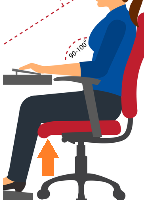 |
|
| The seat depth is too short: There is a large gap of over 3-4 inches between the front edge of the seat and back of the knees | Common in taller individuals. A seat that is too short lacks proper thigh and back support. This causes uncomfortable pressure under the thighs, and stress through the feet and legs. Workers report feeling “unsettled” in their chair.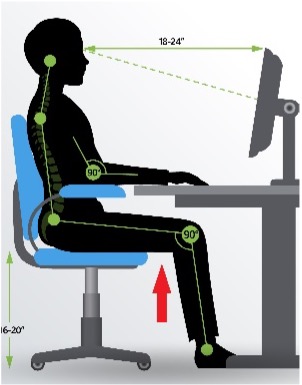 |
|
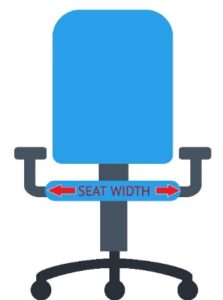
- Check to ensure that your seat is wide enough for your hips.
- A seat at least 1-2” wider than the widest point of your hips is ideal but not always possible.
- Some seats are comfortable even if hips are slightly wider as long as there is no hard edge or upward curve.
- Standard sized ergonomic chair seats range from 18-21” wide.
- The wider the seat, the wider the armrests which is an issue for those with narrow shoulders, especially females.
| Problems | Description | Solutions |
| The seat is too narrow | Hips are much wider than the seat cushion. The sides of the hips may experience uncomfortable pressure from the firm edge of the seat. In some cases, the hips may actually roll inward due to a higher seat edge causing hip and low back discomfort. Hips may hit the armrests. |
|
| The seat is too wide | The seat has excessive room on each side, and armrests are much wider than the shoulders and body. |
|
Step 4: Lumbar (low back) Support Height Adjustment
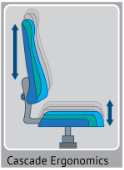
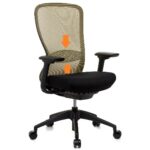
Many chairs will allow you to adjust the lumbar support up and down to fit the curve of your back.
- Lumbar support in the first image is adjusted by raising and lowering the entire backrest.
- In the second image, adjustments are made by reaching behind the chair and sliding a small lumbar support up or down.
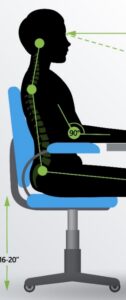 Adjusting your lumbar support height (if adjustable):
- Slide back against the backrest.
- Raise or lower the lumbar support until the largest curve of the backrest fits the largest curve in your low back (as seen in the image)
- Notice how the largest curve of the low back is ABOVE the hip bones.
- You can reach back with your hand to feel the largest curve in your lower back. The lumbar support of the backrest should meet your hand.
- Note: Many workers have the lumbar support too low so that it hits the bony hips instead fitting the curve of the low back. This leaves the back unsupported and the chair fitting poorly.
- You might need to adjust the lumbar support up and down a few times until you find the right fit.
Remember to raise or lower the backrest ONLY to align the lumbar support with the curve in your low back. People mistakenly raise the backrest for more upper back support which throws off the lumbar support.
| Problems | Description | Solutions |
| The lumbar support is too low | Common issue where the lumbar support hits the worker in the hips instead of the curve of the lumbar spine. Workers notice a lack of back support and feel that their chair does not fit right. May push the worker forward in the chair so that the seat depth becomes too short. |
|
| The lumbar support is too high | Uncommon issue that may cause mid to lower back discomfort and slouching. |
|
| Lumbar support is inadequate | The backrest does not have adequate lumbar or back support |
|
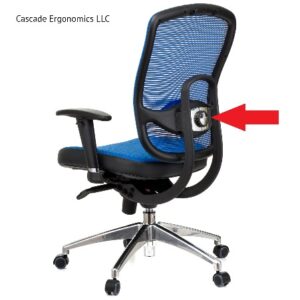
Some chairs allow you to adjust the AMOUNT of lumbar support, usually by turning a knob or inflating an air bladder inside the backrest. This feature is helpful for those requiring maximum support and those with a larger curve in the lumbar spine.
Adding a back cushion: Sounds easy right?
If you prefer extra support in the lower/lumbar area of your back, a back cushion is an economical solution. There are many choices as well as tips you need to be aware of:
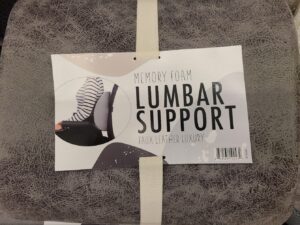
- Beware: Back cushions can push you forward a couple of inches so that your chair does not fit properly. You may need to readjust your seat length to prevent a large gap behind your knees. (Aim for 2-3” of space.)
- Seat length does not adjust: If your chair does not have an adjustable seat, you may need a very thin back cushion or a chair replacement.
- No upper back support: Since back cushions push you forward a couple of inches, your mid to upper back may lose contact with the backrest leaving you unsupported. Consider adding a full-length back cushion to maintain mid to upper back support or use a very thin lumbar support.
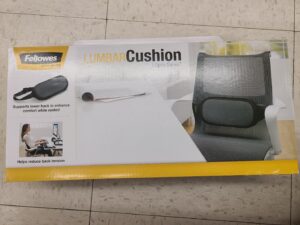
- Smaller back cushion: A towel roll or small pillow may be used to provide lumbar support or to see if a back cushion would be helpful.
Smaller lumbar/back cushion
Adding extra seat cushion: Words of caution
Adding a seat cushion for greater comfort can be helpful, especially with so many inexpensive choices and materials. Some even have a cutout for sensitive tailbones. However, there are issues to consider: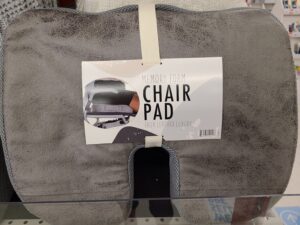
- Caution: Adding a seat cushion may throw off the lumbar support height by raising you in the chair.
- Make sure to readjust the backrest height for proper lumbar support.
- If your chair does not have an adjustable backrest height or lumbar support, then a seat cushion cannot be added, and a chair replacement may be required.
- Seat cushions can be helpful for raising your seat height an extra 1-2” when needed to prevent uphill reaching to the desktop. Again, the chair must have an adjustable backrest height or lumbar support.
Lower and narrower backrests (below the shoulder blades) are best for work tasks requiring more upper body and arm mobility.
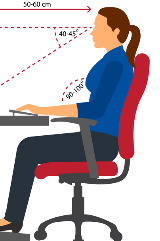
Workers who sit for many hours and perform intensive, focused work tend to prefer taller backrests that support the shoulders. Taller backrests are also more comfortable when reclining.
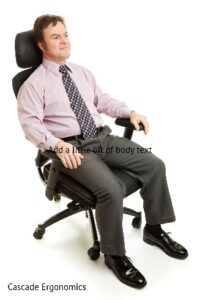
Headrests are not always necessary or desired. You may be a candidate for a headrest if you:
- Like to occasionally recline in the chair
- Perform long hours of intensive, focused computer work
- Have a history of neck pain that improves with support
Headrests are designed to support the curve of the neck and base of the skull. Headrests that contact the back of the skull create uncomfortable pressure and a forward head posture. If you choose to use a headrest, make sure that it can be adjusted for proper fit:
- Some headrests can be raised or lowered
- Some headrests tilt up and down to better accommodate the curve of your neck
- Ideally, a headrest should offer both adjustments
- A few headrests are removable or flip backwards out of the way when not in use
Most ergonomic chairs should be equipped with levers that allow you to recline the backrest.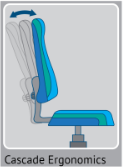
- Tilt Tension Knob: Most chairs have an adjustable tension knob to control backrest tilt. Lighter workers may need less tension while taller or heavier workers may need more tension.
- Back Lock Lever: Some chairs also have a lever that allows you to adjust and lock the backrest into your preferred reclining angle.
Note: At the very least, a chair should have a tilt tension control. Having both features is nice to help maximize comfort.
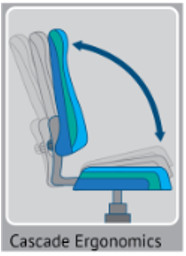 Some chairs provide the added option of tilting the entire chair and seat forward or backward with either a control lever or free-floating mechanism:
- Most people prefer a level seat for an upright typing posture.
- Some prefer periods of reclining for resting and comfort.
- Occasionally, a worker may prefer a slightly forward seat tilt for intense typing or focus.
Should you use arm rests?
Pros of using armrests
- Can provide neck and shoulder support
- Can reduce discomfort and fatigue in some workers
- Can be used for resting when the worker is not typing
Cons of using armrests
- Not all armrests adjust correctly for typing
- Many standard armrests are too wide for females
- Armrests can increase pressure to the elbows and soft tissue of the forearms
- Armrests can bump into the desk and make it harder to reach the keyboard
- Armrests can make it difficult to work at a corner desk by bumping into the desk and forcing more of a reach (more on corner desks in the next modules)
- Armrests can be more harmful than helpful when adjusted incorrectly
The verdict
- Armrests can provide valuable support to the neck, shoulders and spine but only if they fit properly and do not get in the way.
- Not everyone prefers to use armrests. Many workers are comfortable typing for hours without armrests, as long as they are in a proper posture.
- If armrests do not fit correctly, it is recommended that you type without them. You can still use them for rest when you are not typing (about 10-20% of the day is enough rest for most people’s shoulders).
Many prefer to use armrests for occasional resting vs. typing as it reduces the constant pressure from the arm pads and prevents them from getting in the way while typing. Remember, it all comes down to personal preference, typing style and fit. The choice is yours!
If you use arm rests, let’s get them adjusted
- Relax: With your hands in your lap, relax your neck and shoulders.
- Arm Angles: Bend the elbows approximately 90 degrees so that your forearms are parallel to the floor as if you were typing.
- Height: Raise armrests until they just meet your forearms without elevating shoulders.
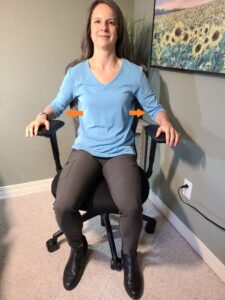
- Width: If arm pads slide or rotate, adjust them in or out until they line up under your shoulders. On some chairs, the armrests adjust in or out where they attach underneath the seat cushion. Due to narrower shoulders, some females will not be able to get the armrests close enough to the body unless they have a narrower chair or highly adjustable armrests.
- Keep arms at sides: Elbows should relax near your sides without having to reach out sideways to use the armrests.
- Length: If arm caps adjust forward and backward, fine tune the length to distribute pressure comfortably over the forearms and to prevent armrests from bumping into the desk.
| Problems | Description | Solutions |
| Armrests are too high | 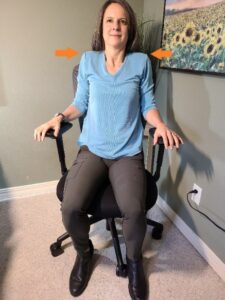 Pushes shoulders upward, increases tension on the neck and shoulders and causes pressure at the elbows and forearms. |
|
| Armrests are too wide | Causes the elbows to reach out to the side placing stress on the neck and shoulders and causes awkward wrist posture while typing
|
|
| Armrests are too long | Causes armrests to bump into the desk. Makes it harder to reach the keyboard. Prevents you from being able to work in a corner desk. |
|
Castors/Wheels:
Many chairs come standard with castors for carpet. Higher quality chairs allow you to select castors for either carpet or hard surfaces. Hard surfaces such as wood or tile require softer or locking castors to prevent chairs from rolling too easily. If you have carpet castors on a harder floor, you may place a large piece of thin carpeting under your desk and chair to prevent rolling.
Need More Help Finding a Chair?
- “Just tell me what chair to get”
- “I need help finding a chair that fits”
- “Where do I shop for a chair”
- “What is the best chair for my budget?
- “Are there any inexpensive options?”
- “How much do I have to spend on a really good chair?”